
From Sensor to Sound: Building a Hardware-Controlled Synth with Elixir and Arduino




Subscribe to receive Elixir news to your inbox every two weeks.

Expand your skills
Download free e-books, watch expert tech talks, and explore open-source projects. Everything you need to grow as a developer - completely free.
In my previous article, I described how to use Circuits.UART library to read and display data from the Arduino microcontroller using the serial monitor. This time, I want to go a step further and show how to use sensors to generate sounds.
So, it’ll not only be about receiving the input, but also transforming the data and creating the output audio. The project I’ll show is rather small and simple, but it can act as a foundation for more advanced sound systems, such as DIY synthesizers. Also, the architecture that uses Elixir code as a bridge between signals sent from Arduino (input) and the output transformed into a readable form can be recreated in other systems - not only those based on sound, but also in visuals, robotics, generative installations, or any real-time interactive system.
Equipment and setup
We’ll start by making a very simple setup using a potentiometer, a tact-switch button, and an LDR (photoresistor). Of course, it’s way too minimalistic for a real-world scenario synth, but it will show various kinds of sensors that can be used in a bigger project. We’ll have analog ones - handled by user action (potentiometer), and something more independent of the user's intention (LDR that reacts to light), and a digital one - the tact-switch that provides a binary value.
Below, I’m showing what’s needed for assembling this small circuit:
- Arduino Uno microcontroller
- breadboard
- 10 kΩ potentiometer
- tact-switch button
- LDR (photoresistor)
- 10 kΩ resistor
- set of jumper wires
We’ll make a circuit as follows:
Potentiometer: connect one pin to 5V, one to an analog input on the Arduino (A0 in our case), and the third to GND.
LDR: connect one end to a 5V power supply, the second to the analog pin (A3) through a resistor, which also connects to the GND pin.
Tact-switch button: connect one pin to the digital pin on Arduino (D2), and the second to GND.
Arduino & Elixir: handling data with Circuits.UART
The first part of the project is quite similar to the strategy I described in the earlier article, so if you know how to use Circuits.UART, please check it! Here, I’m showing only the final Arduino and Elixir code that handles data coming from sensors.
```cpp
/*
 * Sensor Reader for Elixir/OSC Integration
 *
 * Reads potentiometer, light sensor, and button values
 * and sends them via Serial in format: "TYPE,ID,VALUE\n"
 */

const int potPin = A0;
const int ldrPin = A3;
const int btnPin = 2;  // Digital pin 2 with internal pull-up

// Button debouncing variables
int lastBtnState = HIGH;
int currentBtnState = HIGH;
unsigned long lastDebounceTime = 0;
const unsigned long debounceDelay = 50;

void setup() {
  Serial.begin(115200);
  pinMode(btnPin, INPUT_PULLUP);
  lastBtnState = digitalRead(btnPin);
  currentBtnState = lastBtnState;
}

void loop() {
  int potValue = analogRead(potPin);
  int ldrValue = analogRead(ldrPin);
  int btnValue = readDebouncedButton();

  // Send sensor data in format: "TYPE,ID,VALUE\n"
  Serial.print("POT,1,");
  Serial.println(potValue);

  Serial.print("LIGHT,1,");
  Serial.println(ldrValue);

  Serial.print("BTN,1,");
  Serial.println(btnValue);

  Serial.flush();
  delay(100);
}

/**
 * Reads button with debouncing.
 * Returns 1 if pressed (LOW due to INPUT_PULLUP), 0 if not pressed.
 */
int readDebouncedButton() {
  int reading = digitalRead(btnPin);

  // If button state changed, reset debounce timer
  if (reading != currentBtnState) {
    lastDebounceTime = millis();
  }

  // If enough time has passed since last change, update stable state
  if ((millis() - lastDebounceTime) > debounceDelay) {
    if (reading != lastBtnState) {
      lastBtnState = reading;
    }
  }

  currentBtnState = reading;

  // INPUT_PULLUP means LOW = pressed, HIGH = not pressed
  return (lastBtnState == LOW) ? 1 : 0;
}
```
```elixir
defmodule SensorUart do
  @moduledoc """
  GenServer that reads sensor data from a UART serial port and forwards
  parsed messages to the Mapper module.

  Expected data format: "TYPE,ID,VALUE\\n"
  Example: "POT,0,512\\n"
  """
  use GenServer
  require Logger

  @baud_rate 115_200

  def start_link(opts) do
    GenServer.start_link(__MODULE__, opts, name: __MODULE__)
  end

  @impl true
  def init(opts) do
    # Serial port of the Arduino device.
	  # On macOS, you can list available ports with: ls /dev/cu.usb*
	  # On Linux: ls /dev/ttyACM* or ls /dev/ttyUSB*
    port = Keyword.get(opts, :port, "/dev/cu.usbmodem101")

    with {:ok, uart} <- Circuits.UART.start_link(),
         :ok <- Circuits.UART.open(uart, port, speed: @baud_rate, active: true),
         :ok <- Circuits.UART.flush(uart, :both) do
      Logger.info("UART port opened successfully")
      {:ok, %{uart: uart, buffer: ""}}
    else
      {:error, reason} ->
        Logger.error("Failed to open UART port: #{reason}")
        {:stop, reason}
    end
  end

  @impl true
  def handle_info({:circuits_uart, _port, data}, state) do
    new_buffer = state.buffer <> to_string(data)
    {lines, rest} = consume_lines(new_buffer)

    # Filter out empty lines, fragments, and invalid sensor types
    # (e.g., "OT" from split "POT" when data arrives mid-transmission)
    lines
    |> Stream.map(&String.trim/1)
    |> Stream.filter(&(&1 != ""))
    |> Stream.filter(&Regex.match?(~r/POT|LIGHT|BTN.*/, &1))
    |> Enum.each(&handle_line/1)

    {:noreply, %{state | buffer: rest}}
  end

  # Splits buffer into complete lines (ending with \n) and returns
  # the incomplete remainder for the next message.
  defp consume_lines(buffer) do
    parts = String.split(buffer, "\n")

    case parts do
      [] ->
        {[], ""}

      [last] ->
        {[], last}

      complete_parts ->
        complete_lines = Enum.take(complete_parts, length(complete_parts) - 1)
        remainder = List.last(complete_parts)
        {complete_lines, remainder}
    end
  end

  defp handle_line(line) do
    clean_line = String.trim_trailing(line, "\r\n")

    if String.length(clean_line) < 5 or not String.contains?(clean_line, ",") do
      :skip
    else
      case parse_line(clean_line) do
        {:ok, message} ->
          Mapper.handle(message)

        {:error, reason} ->
          # Only log errors for lines that look valid but failed parsing
          # (skip logging for corrupted fragments to avoid spam)
          valid_prefix = String.starts_with?(clean_line, "POT") ||
                         String.starts_with?(clean_line, "LIGHT") ||
                         String.starts_with?(clean_line, "BTN")
          if String.length(clean_line) > 5 and valid_prefix do
            Logger.error("Failed to parse line: #{reason}")
          end
          :skip
      end
    end
  end

  # Parses a line in the format "TYPE,ID,VALUE"
  # Returns {:ok, map} or {:error, reason}
  defp parse_line(line) do
    unless String.valid?(line) do
      {:error, "Invalid UTF-8 in line: #{inspect(line)}"}
    else
      parts =
        line
        |> String.trim()
        |> String.split(",")

      with [sensor_type, sensor_id_str, value_str] <- parts,
           {:ok, type} <- parse_sensor_type(sensor_type),
           {id, _rest_id} when is_integer(id) <- Integer.parse(String.trim(sensor_id_str)),
           {val, _rest_val} when is_integer(val) <- Integer.parse(String.trim(value_str)) do
        {:ok, %{sensor_type: type, id: id, value: val}}
      else
        other_list when is_list(other_list) ->
          {:error, "Invalid line format: expected 'TYPE,ID,VALUE', got: #{inspect(line)}"}

        {:error, reason} ->
          {:error, reason}

        :error ->
          {:error, "Invalid sensor_id or value (not an integer): #{inspect(line)}"}
      end
    end
  end

  defp parse_sensor_type("POT"),   do: {:ok, :pot}
  defp parse_sensor_type("LIGHT"), do: {:ok, :light}
  defp parse_sensor_type("BTN"),   do: {:ok, :btn}
  defp parse_sensor_type(other),   do: {:error, "Unknown sensor type: #{inspect(other)}"}
end
```
What is specific to this project is the way we parse our incoming data. We add atoms (:pot, :btn, :light) to make it easier to handle them in later steps.
Elixir: mapping our data to the MIDI range
Now, when we are getting our data, we also need to recalculate our values to make them in the range 0-127. That’s necessary because the MIDI protocol uses 7-bit values (0-127), while Arduino sensors use 10-bit (0-1023). So, we need a module I named Mapper, which handles this transformation and also passes data to the SynthOut module. For the tact-switch button, which handles digital values, we use an arbitrary MIDI value of 60 (middle C) at max velocity (127).
```elixir
defmodule Mapper do
  @moduledoc """
  Maps sensor values to MIDI/OSC commands.

  Handles three sensor types:
  - `:pot` (potentiometer) - maps 0-1023 to MIDI CC 0-127
  - `:light` (light sensor) - maps 0-1023 to MIDI CC 0-127
  - `:btn` (button) - sends note on/off for MIDI note 60 (middle C)
  """
  require Logger
  alias SynthOut

  # MIDI note 60 = middle C (C4)
  @midi_note 60
  @max_velocity 127
  # Potentiometer controls filter
  @cc_number_pot 0

  def handle(%{sensor_type: :pot, value: value}) do
    handle_analog_sensor(value, "POT", @cc_number_pot)
  end

  def handle(%{sensor_type: :light, value: value}) do
    cc = map_0_127(value)
    SynthOut.light(cc)
    :ok
  end

  def handle(%{sensor_type: :btn, value: 0}) do
    SynthOut.note_off(@midi_note)
    :ok
  end

  def handle(%{sensor_type: :btn, value: 1}) do
    SynthOut.note_on(@midi_note, @max_velocity)
    :ok
  end

  def handle(%{sensor_type: :btn, value: value}) do
    Logger.error("Invalid value for BTN: #{inspect(value)}")
    :error
  end

  def handle(%{sensor_type: unknown}) do
    Logger.warning("Unknown sensor type: #{inspect(unknown)}")
    :error
  end

  # Maps analog sensor values (0-1023) to MIDI CC
  defp handle_analog_sensor(value, _sensor_name, cc_number) when is_integer(value) do
    cc = map_0_127(value)
    SynthOut.cc(cc_number, cc)
    :ok
  end

  defp handle_analog_sensor(value, sensor_name, _cc_number) do
    Logger.error("Invalid value for #{sensor_name}: #{inspect(value)} (expected integer)")
    :error
  end

  # Maps sensor value from 0-1023 range to MIDI CC range 0-127
  @spec map_0_127(number()) :: integer()
  defp map_0_127(value) do
    round(value * 127 / 1023)
  end
end
```
Elixir: sending OSC messages with oscx library
How can I pass data to the output device or program? For this, we’ll use the oscx library, which encodes and decodes Open Sound Control (OSC) messages. OSC is the protocol used to control sound synthesizers and software environments (such as Pure Data, Max/MSP, SuperCollider, or other interactive audio-visual systems). As you can see in the code, we define the @osc_port attribute (a UDP port for OSC messages) with a value of 12000, and @osc_ip as {127, 0, 0, 1} (the IPv4 address of localhost). The cc function encodes an OSC message with OSCx methods, sends it via UDP, and then closes the socket. It’s done similarly with the note_on and note_off functions, yet they serve as message handlers for digital data from the tact-switch.
```elixir
defmodule SynthOut do
  @moduledoc """
  Sends OSC (Open Sound Control) messages via UDP to control a synthesizer.

  All messages are sent to localhost (127.0.0.1) on port 12000.
  Each message opens a new UDP socket, sends the data, and closes it.
  """
  require Logger

  @osc_port 12000
  @osc_ip {127, 0, 0, 1}

  @doc "Sends a MIDI Control Change (CC) message."
  def cc(num, value) do
    send_osc("/cc", [num, value])
  end

  @doc "Sends a Light Sensor Control message."
  def light(value) do
    send_osc("/light", [value])
  end

  @doc "Sends a MIDI Note On message."
  def note_on(note, velocity) do
    send_osc("/note_on", [note, velocity])
  end

  @doc "Sends a MIDI Note Off message."
  def note_off(note) do
    send_osc("/note_off", [note])
  end

  # Sends an OSC message via UDP.
  # Opens a new socket for each message (simple but not optimal for high frequency).
  defp send_osc(address, arguments) do
    message = %OSCx.Message{address: address, arguments: arguments}
    encoded = OSCx.encode(message)

    case :gen_udp.open(0) do
      {:ok, socket} ->
        :gen_udp.send(socket, @osc_ip, @osc_port, encoded)
        :gen_udp.close(socket)
        :ok

      {:error, reason} ->
        Logger.error("Failed to open UDP socket: #{inspect(reason)}")
        {:error, reason}
    end
  end
end

```
PureData: transforming signals into sounds
Now that we have our data transformed into MIDI format and sent as OSC messages, we need to create a patch that recreates our signals as proper sounds. We’ll use PureData for it, but, of course, we can use a different software, as well as a physical synthesizer (via MIDI), or any audio engine capable of receiving OSC messages.
Here’s the example patch:
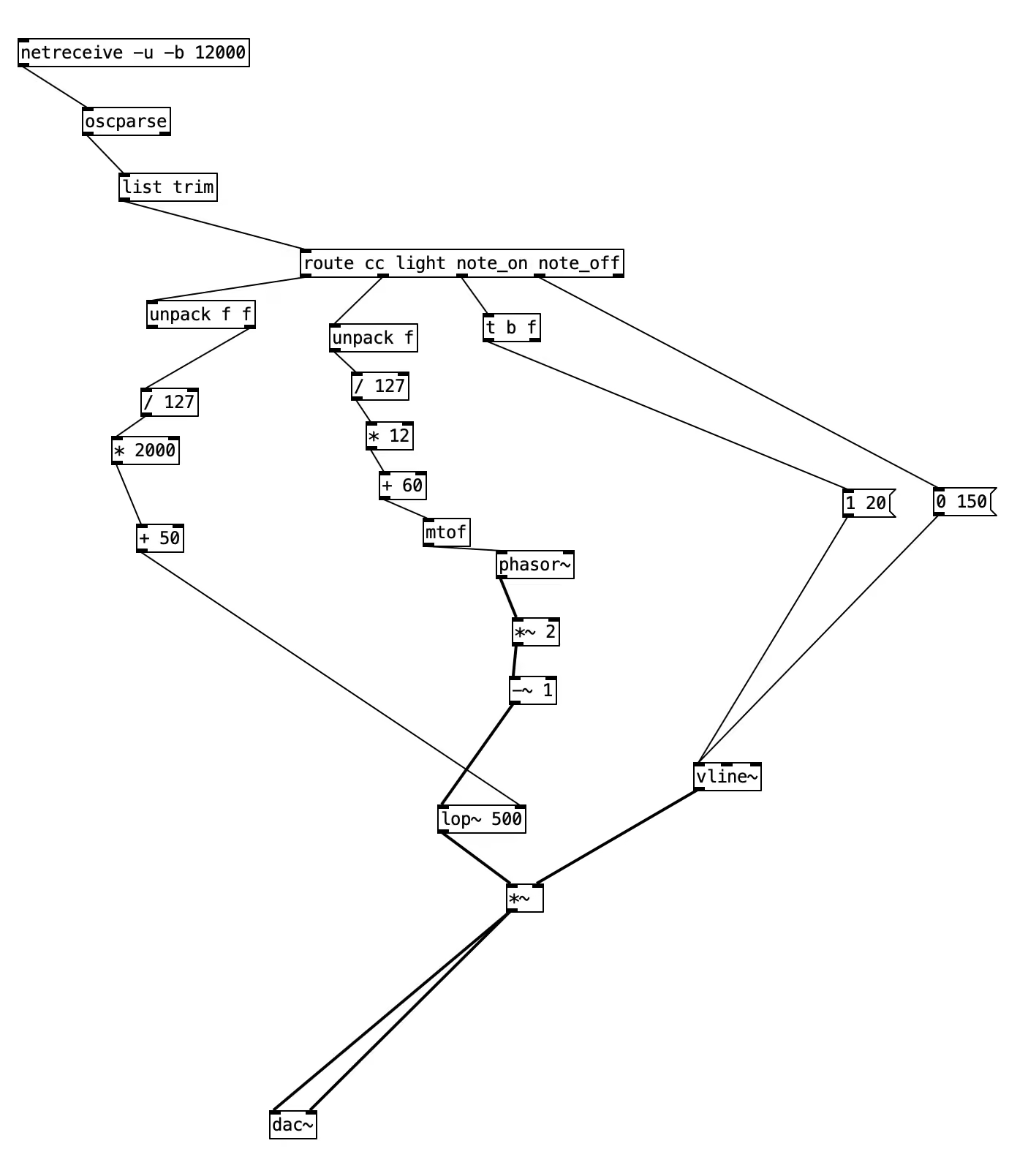
The focus of this article is the Elixir code, so I won’t go into a detailed description of the PureData objects. You can learn more about this in the official documentation, but I’ll explain the general picture of what’s going on here.
- The patch receives data as OSC messages (
netreceive → oscparse → list trim) from Elixir. Then, we split them into four routes:cc(potentiometer),light(LDR),note_on(button on),note_off(button off). - The potentiometer values are normalized and scaled to a useful range, then sent into the filter (
lop~) and the amplitude multiplier (*~). In practice, this means that turning the knob affects the sound’s loudness. - The LDR value (brighter → higher, darker → lower) is mapped to a small melodic range, converted from MIDI to frequency (
mtof), and used to drive a phasor-based oscillator (phasor~). - The note_on and note_off control turning on\off the sound by generating envelopes (using
vline~) and shaping how the signal fades in and out through the amplitude multiplier (*~).
Demonstration of the synth’s building blocks: a button for on/off control, a potentiometer for volume, and a photoresistor for pitch.
Real-world use case scenarios
One might ask: isn’t the Elixir part overkill, especially given libraries such as Mozzi, which allow one to create a standalone Arduino synthesiser without the bridge part altogether? While for simpler projects (like the one we created) that’s mostly true, there are real-world cases when the above approach makes total sense, e.g.:
- Complex synth systems with a lot of sensors and high-frequency data streams (e.g., IMUs, distance sensors, touch matrices, multi-pot setups) - Elixir could be useful in processing, mapping, and normalizing data
- Systems that use networking, OSC, WebSockets, or multi-device communication (such as installation art, interactive exhibitions, or IoT sound systems) - Elixir can be great here for sending OSC over UDP, TCP/UDP clients, web interfaces (with the use of Phoenix/LiveView)
- Advanced DSP or polyphonic synthesis beyond Arduino’s capabilities: Mozzi supports only microcontroller-scale synthesis, whereas the additional Elixir code enables advanced filters and granular techniques.
- Real-world public installations that require long-running reliability - Elixir’s concurrency model allows building a fault-tolerant system that can survive Arduino freezes by handling errors gracefully instead of crashing
Summary
I hope the above project successfully demonstrates that Elixir can act as a real-time processing layer between the sensor input and the sound engine. Presented handling of a button, a potentiometer, and a photoresistor can serve as building blocks to make real instruments and installations. You can also use the Elixir code as a basis for a stand-alone synthesiser by adding a Raspberry Pi as the sound engine, rather than relying on a computer and external software such as PureData. Just remember that in that case, integrating the Nerves Project is the best approach, as the above setup focuses on a tethered Arduino-computer workflow.
Want to power your product with Elixir? We’ve got you covered.
Related posts
Dive deeper into this topic with these related posts
You might also like
Discover more content from this category

Discover the power of multi-node communication in Elixir with Mika Kalathil. Learn how to connect nodes, manage clusters, and leverage built-in tools for scalable applications.

When we announced Permit.Absinthe last June alongside the Permit 0.3 and Permit.Phoenix 0.3 releases, we described it as a working proof-of-concept - something you could pull from GitHub and play around with for simple APIs. We also shared a pretty honest TODO list of things that were still missing before the library could be considered a real tool for real applications.
At Elixir Meetup #1, Michał Buszkiewicz shared his extensive knowledge on debugging Elixir applications.