
Fix Alpine + Phoenix LiveView: 5 Integration Patterns [2025]

![Fix Alpine + Phoenix LiveView: 5 Integration Patterns [2025]](https://cdn.prod.website-files.com/6780f4139ab3ae7f7313b0f4/6901b457c96f78ca0a9d7703_Fix%20Alpine%20%2B%20Phoenix%20LiveView_%205%20Integration%20Patterns%20(2025).avif)


Subscribe to receive Elixir news to your inbox every two weeks.

Expand your skills
Download free e-books, watch expert tech talks, and explore open-source projects. Everything you need to grow as a developer - completely free.
If you've tried integrating Alpine with Phoenix LiveView, you've probably hit at least one of these maddening bugs where everything should work, but mysteriously doesn't. The docs say they play nice together. The examples look simple. Yet here you are, debugging phantom state loss and disappearing DOM elements at 2 AM.
Here's the truth: Alpine and LiveView can work beautifully together — but only if you understand their interaction model. Most tutorials skip the gotchas. The official docs assume you'll figure it out. And Stack Overflow answers are scattered across five years of breaking changes.
This article is different. I'm sharing the exact patterns that solved these problems across multiple production applications at Curiosum. No theory. No guessing. Just the 5 critical integration patterns that will save you hours of debugging frustration.
Plucking A back to PETAL
These days, LiveView's JS interoperability is becoming increasingly powerful, leading many developers to remove Alpine entirely from their stack. Mark Ericksen's excellent article "Plucking the 'A' from PETAL" makes a compelling case for this approach.
But here's the thing: complex frontend components still need Alpine. When we needed to build a multiselect dropdown with search and option grouping for a client, LiveComponent alone would have been complex and clunky. Alpine gave us the DOM control we needed - once we figured out how to make it cooperate with LiveView.
What You'll Learn
By the end of this article, you'll understand exactly why Alpine breaks in LiveView, how to prevent it, and which patterns to use for bulletproof integration. If you're impatient, jump to the Key Takeaways section—but I recommend understanding the "why" behind each solution.
Let's fix your Alpine integration once and for all.
Quick Navigation
Problem 1: Lost Alpine State - Components break after updates
Problem 2: Update Delays - Data always one step behind
Problem 3: Data Interpolation - Special characters break JS
Problem 4: Object Comparison - Selected items disappear
Problem 5: DOM Wars - Elements vanish mysteriously
Fundamentals - Installation
First, install Alpine.js in your Phoenix project:
cd assets/
npm install alpinejs
In your assets/js/app.js add:
import Alpine from "alpinejs";

window.Alpine = Alpine;

// Start Alpine
Alpine.start();
Problem 1: Lost Alpine state
What happens: Alpine stores its internal state in _x_* (i.e. x_dataStack) properties on DOM elements (don’t confuse with html attributes). This internal architecture may vary between Alpine versions. Nevertheless, LiveView morphing library wipes out these properties on assigns update. This causes Alpine components to lose their state and break.
We will review here general approaches to this problem that can be found aggregated over the years in various forums in the past many years is to use some combination of the Alpines clone.
Version 1 - Deprecated clone() Function
Why it breaks: In newer versions of Alpine.js (e.g., Alpine v3 and above), the internal clone() function has been deprecated.
// assets/js/app.js

// ❌ Uses deprecated Alpine.clone() - don't use this
const liveSocket = new LiveSocket("/live", Socket, {
  dom: {
    onBeforeElUpdated(from, to) {
      if (from._x_dataStack) {
        Alpine.clone(from, to);
      }
    },
  },
  // ...
});
Version 2 - Alpine Morph plugin
Why it breaks: Although the Alpine Morph plugin is an official plugin and seems fit for the job, it seems to be in conflict with LiveView's morph library. After hours of testing it always resulted in unexpected behaviour like disappearing elements. For consistent behaviour I advise not to use this plugin.
// assets/js/app.js

// ❌ Relies on unreliable @alpinejs/morph
const liveSocket = new LiveSocket("/live", Socket, {
  dom: {
    onBeforeElUpdated(from, to) {
      if (from.hasAttribute("x-data")) {
        Alpine.morph(from, to);
      }
    },
  },
  // ...
});
Solution: Alpine.cloneNode()
Why this works: Alpine.cloneNode() is the recommended approach that properly preserves Alpine state during LiveView updates without conflicting with LiveView's own morphing mechanism.
// assets/js/app.js

const liveSocket = new LiveSocket("/live", Socket, {
  dom: {
    onBeforeElUpdated(from, to) {
      if (from._x_dataStack) {
        Alpine.cloneNode(from, to);
      }
    },
  },
  // ...
});
Problem 2: Update delays
What happens: When you inject LiveView assigns directly into x-data, the Alpine component initializes with stale data, creating a one-tick delay between LiveView state and Alpine state.
Problematic Code
def render(assigns) do
  ~H"""
  <!-- ❌ BREAKS: Alpine's `count` value is always by 1 less than `@counter` after clicking the button -->
  <div x-data={"{ count: #{@counter}}"}>
    <span x-text="count"></span>
    <!-- increments @counter in LiveView -->
    <button phx-click="increment">Click me</button>
  </div>
  """
end

def handle_event("increment",_params, socket) do
	# increments counter
	{:noreply, update(socket, :counter, &(&1+1) )}
end
What breaks: Alpine initializes before LiveView assign (@counter) is fully processed, leading to stale data display that's always one update tick behind.
Solution: Use x-init for Server Data
Declare variables in x-data, but initialize them from the server in x-init:
def render(assigns) do
  ~H"""
  <!-- ✅ WORKS: Declare in x-data, initialize in x-init -->
  <div
    x-data="{ count: 0 }"
    x-init={"count = #{@counter}"}
  >
    <span x-text="count"></span>
    <button x-on:click="userClicks++">Click me</button>
    <span x-text="userClicks"></span>
  </div>
  """
end
Why this works: The x-init directive runs after the component is fully initialized, ensuring LiveView assigns are properly injected into Alpine state without race conditions between Alpine and LiveView DOM updates.
Important You MUST declare all the variables in the x-data to create local variable scope. Otherwise you will be working on a single global copy of variables shared across all the incstances of your component.
Problem 3: Data Interpolation Breaks JavaScript
What happens: When passing server-side data (HEEX @variables) to Alpine.js via x-init, special characters like quotes, newlines, or complex data structures break JavaScript syntax, causing silent failures or errors.
Problematic Code - Direct String Interpolation
def mount(_params, _session, socket) do
  {:ok, assign(socket,
    user_message: "User said: \\"Hello\\"\\nAnd then: 'Goodbye'",
    tags: ["admin", "user", "guest"]
  )}
end

def render(assigns) do
  ~H"""
  <!-- ❌ BREAKS: Unescaped quotes and newlines break JavaScript -->
  <div
    x-data="{ message: '', tags: [] }"
    x-init={"message = '#{@user_message}'; tags = #{inspect(@tags)}"}
  >
    <p x-text="message"></p>
    <p x-text="tags.join(', ')"></p>
  </div>
  """
end
Why it breaks: The generated JavaScript looks like this:
// Invalid JavaScript - syntax error!
message = 'User said: "Hello"
And then: 'Goodbye''; tags = ["admin", "user", "guest"]
The unescaped quotes and newline characters break the JavaScript string syntax.
Solution: Use JSON.encode!
Always use JSON.encode! to safely convert Elixir data to JavaScript:
def render(assigns) do
  ~H"""
  <!-- ✅ WORKS: JSON.encode! properly escapes all data -->
  <div
    x-data="{ message: '', tags: [] }"
    x-init={"message = #{JSON.encode!(@user_message)}; tags = #{JSON.encode!(@tags)}"}
  >
    <p x-text="message"></p>
    <p x-text="tags.join(', ')"></p>
  </div>
  """
end
Why this works: JSON.encode! (built into OTP 28+/Elixir 1.18+) converts Elixir data to properly escaped JSON, which is valid JavaScript:
// Valid JavaScript!
message = "User said: \\"Hello\\"\\nAnd then: 'Goodbye'";
tags = ["admin", "user", "guest"]
Note: For Elixir < 1.18, use Jason.encode! instead of JSON.encode!.
Problem 4: Object Reference Comparison Breaks After LiveView Updates
What happens: When LiveView updates the DOM and Alpine.js uses x-init to reinitialize data, object comparisons using "==" fail because JavaScript compares object references in memory, not their values. Even if two objects have identical data, they're considered different if they're different instances.
Problematic Code - Compare by Reference
This is example of a select component:
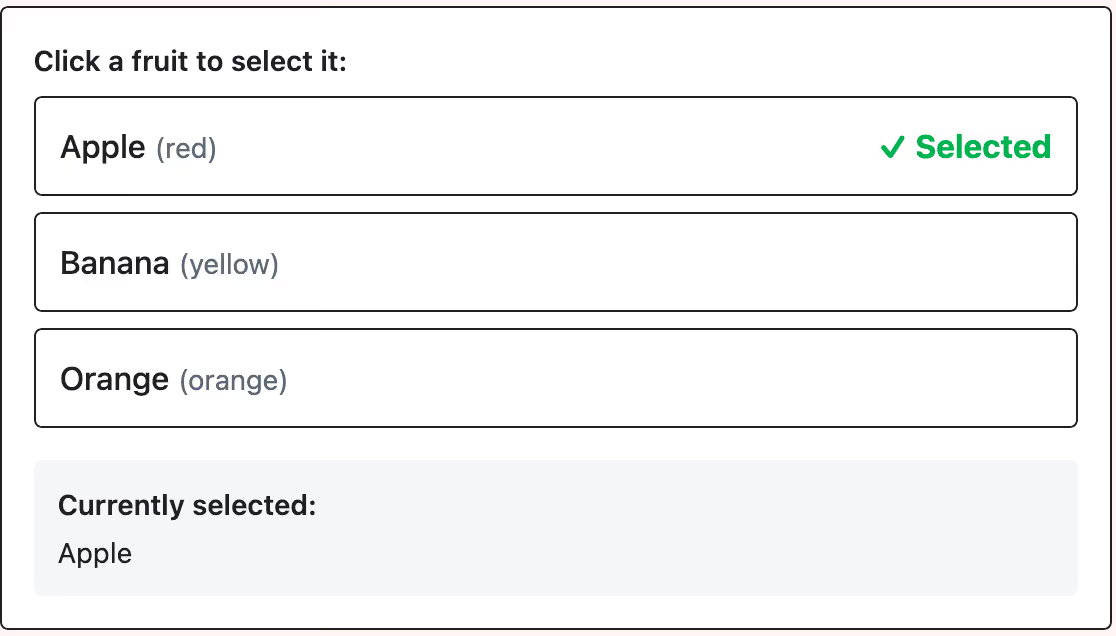
Here is the code:
def mount(_params, _session, socket) do
  {:ok, assign(socket,
    fruits: [
      %{id: 1, name: "Apple"},
      %{id: 2, name: "Banana"},
      %{id: 3, name: "Orange"}
    ]
  )}
end

def render(assigns) do
  ~H"""
  <div
    x-data="{ fruits: [], selected: null }"
    x-init={"fruits = #{JSON.encode!(@fruits)}"}
  >
    <ul>
      <template x-for="fruit in fruits" x-bind:key="fruit.id">
        <li x-on:click="selected = fruit">
          <span x-text="fruit.name"></span>
          <!-- ❌ BREAKS: Comparison fails after LiveView update -->
          <span x-show="selected == fruit">✓</span>
        </li>
      </template>
    </ul>
  </div>
  """
end
Why it breaks:
- User clicks "Banana" →
selectedstores reference to Banana object:{id: 2, name: "Banana"} - LiveView sends update →
x-initruns again → new fruits array created - New Banana object created:
{id: 2, name: "Banana"}(different reference!) selected == fruitcompares:old_banana_ref == new_banana_ref→false- Checkmark disappears even though the data is the same!
The core issue: JavaScript "==" checks if variables point to the same object in memory, not if they have the same content.
Visual comparison:
// ❌ Object reference comparison (BREAKS)
{id: 2, name: "Banana"} == {id: 2, name: "Banana"}  // false (different objects)

// ✅ Value comparison (WORKS)
2 === 2  // true (same primitive value)
✅ Solution: Compare by Primitive Value
def render(assigns) do
  ~H"""
  <div
    x-data="{ fruits: [], selected: null }"
    x-init={"fruits = #{JSON.encode!(@fruits)}"}
  >
    <ul>
      <template x-for="fruit in fruits" x-bind:key="fruit.id">
        <li x-on:click="selected = fruit">
          <span x-text="fruit.name"></span>
          <!-- ✅ WORKS: Compare by ID value -->
          <span x-show="selected?.id === fruit.id">✓</span>
        </li>
      </template>
    </ul>
  </div>
  """
end
Why this works:
- Compare
selected?.id === fruit.id(primitive values) instead of comparing object values - When fruits array is recreated, each fruit gets a new object reference
- But the
idvalue stays the same:2 === 2→true - The
?.operator safely handles when nothing is selected yet
Quick Reference:
- ❌ Never:
selectedItem == itemfor object values - ✅ Always:
selectedItem?.id === item.id- compares primitive values only! - ✅ Or:
selectedItem?.email === item.email(any unique primitive value property)
Problem 5: DOM Wars - LiveView vs AlpineJS
What happens: Both LiveView and Alpine try to control the same DOM. When Alpine dynamically adds elements and LiveView performs an update, those Alpine-added elements disappear, leading to erratic and unpredictable component behavior.
Problematic Code
Every time the button is clicked - Added by Alpine div element is added:
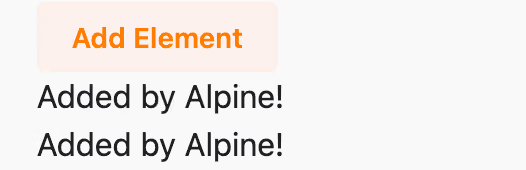
Here is the code:
def render(assigns) do
  ~H"""
  <div x-data>
    <button x-on:click={"$refs.container.insertAdjacentHTML('beforeend', '<div>Added by Alpine!</div>')"}>
      Add Element
    </button>
    <div x-ref="container"></div>
  </div>
  """
end
Why it breaks: Any change/refresh of DOM by LiveView will erase all the dynamically added content that Alpine created.
Solution: phx-update="ignore"
You must choose your approach: either work with LiveView or Alpine to control a specific DOM section, but not both. Use phx-update="ignore" to tell LiveView to ignore a section entirely:
def render(assigns) do
  ~H"""
  <!-- ✅ With phx-update="ignore" -->
  <div x-data phx-update="ignore" id="alpine-controlled">
    <button x-on:click={"$refs.container.insertAdjacentHTML('beforeend', '<div>Added by Alpine!</div>')"}>
      Add Element
    </button>
    <div x-ref="container"></div>
  </div>
  """
end
Why this works: Setting the attribute phx-update="ignore" (together with id) hands all control of the DOM solely to Alpine.js and "switches off" LiveView oversight.
Important: Any LiveView variable inside such a block will only be rendered at the very beginning in the first render. After that, updates will not be reflected.
Key Takeaways
- Always use
Alpine.cloneNode()in your LiveView lifecycle hooks to preserve Alpine state during DOM updates. - Initialize LiveView data with
x-init, not directly inx-data, to avoid state reset issues. Declare all variables inx-datascope! - Always use
JSON.encode!when passing Elixir data to Alpine.js to properly escape special characters - Compare using persistent identifiers (IDs, emails), never object references, when working with dynamic data
- Use
phx-update="ignore"for complex Alpine components that manage their own DOM. Don't forget to add uniqueid=attribute.
Master these patterns, and you'll find Alpine becomes a reliable, powerful tool for enhancing your Phoenix LiveView applications rather than a source of mysterious bugs.
FAQ
Should I use Alpine with Phoenix LiveView in 2025?
Yes, for complex UI components like multiselects, date pickers, and drag-and-drop. While LiveView's JS capabilities have grown, Alpine remains best for fine-grained DOM control.
Why does Alpine lose state after LiveView updates?
LiveView's DOM morphing wipes out Alpine's _x_* properties. Fix: Use Alpine.cloneNode() in onBeforeElUpdated.
What's the difference between x-data and x-init?
x-data declares variables. x-init runs after Alpine initializes. In LiveView, always declare in x-data and initialize server values in x-init.
How do I debug Alpine in LiveView?
Check from._x_dataStack in console. Use Alpine DevTools extension for your browse. Enable LiveView debug: window.liveSocket.enableDebug().
Complete Setup Reference
Here's a complete assets/js/app.js configuration with all best practices:
import Alpine from "alpinejs";

// Initialize Alpine
window.Alpine = Alpine;
Alpine.start();

// LiveView configuration
import { Socket } from "phoenix";
import { LiveSocket } from "phoenix_live_view";

let csrfToken = document.querySelector("meta[name='csrf-token']").getAttribute("content");

let liveSocket = new LiveSocket("/live", Socket, {
  dom: {
    onBeforeElUpdated(from, to) {
      // Use Alpine.cloneNode for elements with Alpine state
      if (from._x_dataStack) {
        Alpine.cloneNode(from, to);
      }
    },
  },
  params: { _csrf_token: csrfToken },
});

liveSocket.connect();

window.liveSocket = liveSocket;
Want to power your product with Elixir? We’ve got you covered.
Related posts
Dive deeper into this topic with these related posts
You might also like
Discover more content from this category

Developer time is precious for business. Don't waste it on things that can be easily automated. One of these things is a part of the code review process - quality checks. Continuous integration (CI) is where this automation is put in place.
Today we're going to look at how Ecto, Elixir's first-choice database access library, handles relational (SQL) database transactions.

Reusable Phoenix widgets without the usual pain. See how a pattern for building stateful, interactive, real-time components that stay fully self-contained and don’t leak complexity into the parent LiveView.